652c7bc0e6640eab567837f73f39865d

Monday, 5 June 2017

Fixation of Pay on Promotion / MACP

Let ‘X’ Postmaster Grade-I official drawing Pay Rs. 44100/- wef 01.07.2016 in the pay band 5200-20200 grade pay 2800 pay matrix level 5 promoted on 25.05.2017 to Pay in Pay band 9300-34800 grade pay Rs. 4200/- pay matrix level 6 of Postmaster Grade-II./MACP-II.

Case: 01 : STRAIGHT AWAY PAY FIXATION:-
25.05.201744100 (RS)
Notional Increment:3%44500
Fix at Paymatrix level 6 grade pay 4200/-46200 WITH DNI:01.01.2018
01.07.201746200
01.01.201847600
01.07.201847600
Case:02 : BY OPTION TO FIX PAY AFTER (accrual)TAKING INCREMETN ON 1ST JULY :-
25.05.201744100 (RS)
NO PAY FIXATION(44900) Next above in level 6. No fixation of pay
01.07.2017 (regular inct)45400
01.07.2017: Pay fixation: one NI+ fix at level 646800-->at level 6 fix Rs. 47600 . 
01.01.201847600
01.07.201849000
NOTE:- Those who are currently drawing increment in JULY on promotion between January to June opt to fix pay after accrual of increment is beneficial . 

//M.S.Reddy , ex-Accountant (P.O & RMS), Hyderabad city//

All about Pradhan Mantri Jeevan Jyoti Bima Yojana


BY SUNIL DHAWAN

Pradhan Mantri Jeevan Jyoti Bima Yojana (PMJJBY) is a one-year life insurance scheme, renewable from year to year, offering coverage for death. The cover under PMJJBY is for death only and hence benefit will accrue only to the nominee. PMJJBY is a pure term insurance policy, which covers only mortality with no investment component. 

PMJJBY is available to people in the age group of 18 to 50 years ( life cover up to age 55) having a savings bank account who give their consent to join and enable auto-debit. The cover is for a one-year period, starting June 1 to May 31. As on May 8, 2017, nearly 3.11 crore people had enrolled under PMJJBY, and the total number of claims received till date were nearly 65,083. 


Under PMJJBY scheme, life cover of Rs. 2 lakhs is available at a premium of Rs.330 per annum per member and is renewable every year. In the case of a joint account, all holders of the said account can join the scheme provided they meet its eligibility criteria and pay the premium at the rate of Rs.330 per person per annum. 

This is how the break-up of the premium works - a. Insurance Premium to the insurance company: Rs.289 per annum per member; b. Reimbursement of expenses to agent/bank: Rs.30 per annum per member; c. Reimbursement of administrative expenses to the participating bank: Rs.11 per annum per member. 

For the cover period 1st June 2017 to 31st May 2018, subscribers are required to enrol and give their auto-debit consent by 31st May 2017. Those joining subsequently would be able to do so with payment of full annual premium for prospective cover. 

Waiting period for claims 

Risk cover under PMJJBY is applicable only after the first 45 days of enrolment. In other words, insurers do not have to settle claims during the first 45 days from the date of enrolment. However, deaths due to accidents will be exempt from the lien clause and will still be paid. 

Enrolment 

PMJJBY is administered through LIC and other Indian private life insurance companies. One may also approach their bankers as for the process of enrolment banks have tied up with insurance companies. In the case of multiple bank accounts held by an individual in one or different banks, the person would be eligible to join the scheme through one bank account only. 

For those who wish to join the scheme now may still do so. On may join or renew the scheme anytime during the year by paying the full premium and not the proportionate amount. However, the renewal date will remain June 1 for all of the subscribers. 

It's better to join now and get the cover for the entire 12 months. If you had exited the scheme at any point, you may still re-join the scheme by paying the annual premium. 

The enrolment process has been kept simple and easy. To enrol, you can download the form and submit it to your banker. Some banks have initiated an SMS-based enrolment process too. It can be done through net banking also. To join/pay by auto-debit from the designated individual bank account on the prescribed forms will be required to be given by 31st May of every year. 

CLAIM SETTLEMENT 

The death claim will be settled by the designated Office of Insurance Company concerned. The process followed will be as under: 

Steps to be taken by the Nominee 

1. Nominee to approach the bank wherein the member was having the 'savings bank account' through which he/she was covered under PMJJBY, along with the death certificate of the member. 

2. Nominee to collect claim form, and discharge receipt, from the bank or any other designated source like insurance company branches, hospitals, insurance agents etc., including from designated websites. 

3. Nominee to submit duly completed claim form, discharge receipt, death certificate along with a photocopy of the cancelled cheque of the nominee's bank account(if available) or the bank account details to the bank wherein the member was having the 'savings bank account' through which he/she was covered under PMJJBY. 

Steps to be taken by the Bank 

1. Upon receipt of death intimation, the Bank should check whether the cover for the said member was in force on the date of his death, i.e., whether the premium for the said cover on Annual Renewal Date, i.e. 1st of June, prior to the Member's death was deducted and remitted to the Insurance Company concerned. 

2. Bank to verify the claim form & the nominee details from the records available to them and to fill in the relevant columns of the claim form. 

3. Bank to submit the following documents to the designated office of the insurance company concerned: 
a. Claim Form duly completed 
b. Death certificate 
c. Discharge Receipt 
d. Photocopy of cancelled cheque of the Nominee (if available). 

4. Maximum time limit for the bank to forward duly completed claim form to the insurance company is thirty days from the submission of the claim to it. 

Steps to be taken at the designated office of Insurance Company 

1. Verify that the Claim form is complete in all respects and all the relevant documents have been attached. If not, take up with the Bank concerned. 

2. If the claim is admissible, the designated office of the insurer shall check whether the member's coverage is in force and no death claim settlement has been effected for the member through any other account. In case any claim has been settled, then the nominee shall be intimated accordingly with a copy marked to the bank. 

3. In case the coverage was in force and no claim has been settled for the said member, payment shall be released to the nominee's bank account and a communication shall be sent to the nominee with a copy marked to the bank. 

4. Maximum time limit for the insurance company to approve claim and disburse money is thirty days from the receipt of the claim from the bank. 

n the case where the claim form is directly submitted to any office of the insurer by the claimant, then the insurer's office would forward the same to the concerned bank of the deceased account holder immediately to get necessary verification etc. done from the bank concerned. The concerned bank branch will forward the claim form to the designated office of the insurance company for processing the claim. 
Source: www.jansuraksha.gov.in 

Courtesy :-The Economic Times

E-commerce is way forward for Postal department: Sinha

Ranchi, Jun 4 (UNI) Union Minister of State for Telecom Manoj Sinha today said with changing times the postal department too needed to change and suggested that the way forward for the department is the area of e-commerce.
Addressing a function here after inaugurating the Postman Mobile App he said with changing times India Post was also changing and added that during the last three years many steps have been taken to improve customer facilities at the post offices.

Mr Sinha said the tradition letter writing has come to an end and e-commerce is the way forward.


He said share of the railways and the postal department in the parcel handling segment in the country which was estimated to around 2 lakh crore was very less.

The union minister said talks have been held between the senior officials of both department to think on ways to increase the share in segment.

He said the postal department around the world has faced challenges, however the achievements in the e-commerce sector was far greater than than witnessed due to the downfall in the post handling.

Mr Sinha said as per the requirement of the customer the department was changing. The Postman mobile app has been developed by the Center for Excellence in Postal Technology Mysore which would enable real time update of delivery made.

He said the department was also working on network optimisation and said that the department was working with e-commerce majors such as Amazon and Snapdeal and Jabong in the e-commerce segment.

The minister said work on IT modernisation was on and in 980 locations ATMs have been installed.

Mr Sinha said in the country in several states the postal banks have been set up in rural areas while at 125 places passport seva kendras would be made functional.

He said passport seva kendras in the GPO of Jamshedpur and Deoghar were now operational and soon the facility would be present in Dhanbad.

Chief Post Matser General (Jharkhand Circle) Shalini Sashi Kujur and other officials of the Post and Railways Department were present on the occasion. UNI AK BM

RICT Guide in Hindi - useful for BPMs/SPMs/IPs/ASPs for day to day operations related to RICT project.

"RICT Guide in Hindi " . It will be useful for BPMs/SPMs/IPs/ASPs for day to day operations related to RICT project. 


http://sapost.blogspot.in/

Download

PLI : Good News for Customers

ATM card issues and solutions in DOP Finacle


1.1. Card is not activated

Issue Description: Card is not getting activated.
Solution: For the specified card, if it is personalized, check whether the kit number is entered. As per the functionality kit number should not be entered for personalized cards. Remove the kit number using modify mode in CCMM menu and proceed further. The card will be activated.

If any wrong details have been given, user can use Delete Mode to delete the already existing details and add the correct details again using ADD Mode in CCMM menu.

Check whether the card is in inactive status. If the card is in either Delivered or inactive status then only the card can be activated.

1.2. No SB accounts exists for the specified CIF ID

Issue Description: When the user is trying to add a cif id or verify, user is getting an error like "No SB accounts exists for the specified cif id"
Solution: If The sol_id with which the user tries to add the ATM card request in CCMM menu is different from the home sol id of that cif id this error occurs.

Please ask the user to add the ATM card request in the home sol id.

1.3. Invalid card number

Issue Description: When the user is trying to modify card details user is getting error as "Invalid Card number"
Solution: If it is a personalized card,this error occurs mostly when the card details are not updated in the YCS database.

Invoke CCMM menu in inquire mode. it shows details of YCS database. If the status is still as REQ in inquire mode. It means the card is not yet activated.
Hence the user is not able to modify the card details. Please download the file in CCDM menu and the card needs to be activated in YCS. Then the user can modify the details in CCMM menu.

1.4. Hotlisting of a particular Card Failed

Issue Description: User is not able to hotlist a card in modify mode. Error message is getting displayed.
Solution: A card can only be hotlisted if it is in active status. If the card is not currently active it cannot be hot listed.

Hot listing of the card will directly update the status in CMS. In CMS, if the card is not active, then hot listing fails.

1.5. ATM Pin Generation Failed

Issue Description: The ATM PIN is not generated even if the status is changed to ATM PIN Request in modify mode.
Solution: In CCMM menu in modify mode, action should be selected as ATM Pin Request. Later on in CCDM menu, Renewal/Re-issue file needs to downloaded and uploaded in CMS DB. Flow has to be completed.

If the flow is not completed the PIN Generation will fail.

1.6. Not able to Modify Closed Cards

Issue Description: User is not able to modify the Card.
Solution: Invoke CCMM in inquire mode and check for the status of the card.If the current card status is closed, no more modification is allowed for the cards. Only hotlisting can be done for closed cards.


If the status is closed and the user wants to make the card active, please delete the card and add a new card.

Error message is being displayed for the same.

1.7. Account is already attached with a card

Issue Description: Unable to issue ATM card because of the error message Account is already attached with a card.
Solution: For this cif id and foracid, already a new card request may already have been raised. It may be either in verified or non verified state. Hence while raising new card request specified error will occur. Kindly verify the previous card and use it (if the previous card is in unverify state) or delete the card and raise a new card request(if the previous request is no longer needed).

1.8. Error while linking

Issue Description: Unable to link an account to ATM card, showing error as "There is no account exists in this sol id".
Solution: The specified cif id and account number belongs to some other sol. Hence the user is not able to link the card.

Invoke HACLI menu and find the sol id of the account and kindly change the sol id of the account and try again. Please check.

1.9. Invalid account number

Issue Description: While trying to issue card to sb account, "Invalid Account" Error occurs.
Solution: The given SB account does not belongs to the cif id mentioned. Hence the error occurs. Kindly give the correct account number or select account number from searcher. If searcher does not display data then no SB accounts have been opened under that cif Id.Kindly open an account and proceed issuing a card.

1.10. Invalid kit number

Issue Description: While trying to personalized card, error is thrown as "Invalid kit number".

Solution: The kit number has already been used to raise a new card request for another cif. Hence the same kit number cannot be used, that is why the error is being thrown. Please use a different kit number to raise a new card request.

If the Kit number is not used previously, then raise a request to ATM team.

1.11. Process of activation of cards

Issue Description: Clarify on the process of Activation of cards.
Solution:
1. Invoke CCMM menu and raise a new card request and verfiy the same.
2. Invoke CCDM menu and download the New Customer Registration file with sol id and cif verification date as input and download the file and send it to YCS db. The card will be activated

Employee joined with fake Caste Certificates to be dismissed – DOPT Order

Fake Caste Certificate – Compilation of information about appointments made on the basis of fake/ false caste certificates and follow up action taken thereon
No.36027/1/2017-Estt. (Res)
Government of India
Ministry of Personnel, Public Grievances and Pensions
Department of Personnel and Training
Establishment (Res-I) Section
North Block, New Delhi
Dated June 1, 2017

OFFICE MEMORANDUM

Subject: Compilation of information about appointments made on the basis of fake/ false caste certificates and follow up action taken thereon – regarding 


This Department have been 3 receiving references from various Ministries/ Departments regarding appointments made on the basis of fake/ false caste certificates despite the instructions contained in the Department’s OM. No. 11012/1/91-Estt.(A) dated 19.05.1993, which have been re-iterated vide OM. No. 3601 1/1/2012 Estt.(Res.) dated 10.01.2013. The instructions provide that if it is found that a Government servant had furnished false information or produced a false certificate in order to secure appointment, he should not be retained in service. Thus when an appointing authority comes to know that an employee had submitted a false/ fake caste certificate, it has to initiate action to remove or dismiss such an employee from service as per the provisions of relevant Service Rules.

2. It has been decided to collect information from all the Ministries /Departments about appointments made on the basis of fake/ false caste certificates and follow up action taken thereon. Therefore, all the Ministries /Departments are requested to collect information from all Organisations under their administrative control about the cases where the candidates got/ alleged to have got appointment against vacancies reserved for Scheduled Castes, Scheduled Tribes and Other Backward Classes on the basis of false/ fake caste certificate and send a consolidated report in this regard in the enclosed Proforma to this Department by 15.07.2017 positively.

Encls: As above.

(Raju Saraswat)
Under Secretary to the Government of India

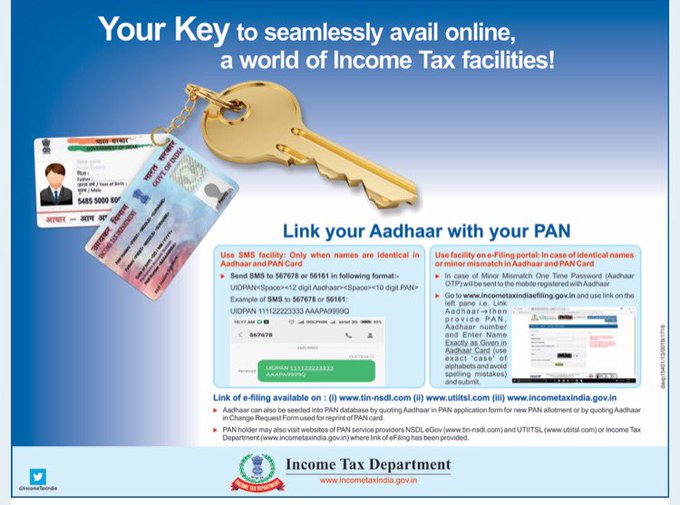
Link your Aadhaar with PAN through just an SMS

Now you can link your Aadhaar with PAN using just an SMS. Your mobile number and e-mail id will help you receive alerts related to your Aadhaar and to access Aadhaar services easily. The Income Tax Department on Wednesday issued advertisements and described how both the unique identity numbers of an individual can be linked by sending an SMS to either 567678 or 56161.

Here is how you can use the SMS facility to link Aadhaar with PAN
Send SMS to 567678 or 56161 in following format:

UIDPAN<SPACE><12 digit Aadhaar><Space><10 digit PAN>
Example:
UIDPAN 111133333321 AAAAAEEEEE
It said people can also visit the official e-filing website of the department to link the two identities, in both the cases-- identical names in the two databases or in case where there is a minor mismatch.


Your key to seamlessly avail online,
a world of Income Tax facilities!
Link your Aadhaar with your PAN;


It said linking the two numbers is the key to "seamlessly avail online, a world of income tax facilities."

"Aadhaar can also be seeded into PAN database by quoting Aadhaar in PAN application form for new PAN allotment or by quoting Aadhaar in change request form used for reprint of PAN card," it said in the advertisement.

Why is it important to link Aadhaar with PAN?

The Income Tax Department is urging taxpayers to link their Aadhaar with their PAN, using an SMS-based facility because from July 1, 2017, all tax returns will have to mention the Aadhaar number.

If you have both the permanent account number (PAN) and Aadhaar, you need to link the two. If you fail to do so, your PAN number could become invalid.

How to link your Aadhaar to PAN online:

1. Log on to incometaxindiaefiling.gov.in. (This step is not compulsory. You can directly jump to Step 2, if you do not wish to log in)

2. Click on 'Link Aadhaar' 

3. A pop up window will appear. Enter your Aadhaar number, PAN number and name as per Aadhaar 

4. Enter captcha and click on 'Link Aadhaar'.
link-adhar-pan
In case of any minor mismatch in Aadhaar name provided, Aadhaar OTP (one-time password) will be required. The OTP will be sent on the registered mobile number in the Aadhaar database.


Linking mobile number with Aadhaar

You need to do this offline.

—Visit your nearest Aadhaar centre to get the Aadhar Update/Correction Form or download it from the UIDAI website.

— Fill out the form correctly; submit it to the concerned person at the centre and mention on the form that only mobile number is to be updated. 

— While submitting the update form, along with photocopy of your Aadhaar card you also need to provide photocopy of an Identity proof document such as PAN Card, Passport, Voter ID card

— Following the submission, your biometrics will be verified at the enrolment centre. Your thumb impression will be verified. While applying for Aadhaar your biometrics were recorded and to authenticate the changes, they are verified. 

— After verifying the biometrics, you will be given an acknowledgement slip. Usually, it takes 2-5 working days for the update to happen but as per the UIDAI helpline, the turnaround time for the update is 10 days.

The government, under the Finance Act 2017, has made it mandatory for taxpayers to quote Aadhaar or enrolment ID of Aadhaar application form for filing of Income-Tax returns (ITR).

While Aadhaar is issued by the UIDAI to a resident of India, PAN is a ten-digit alphanumeric number issued in the form of a laminated card by the I-T department to any person, firm or entity.

Sanction for acquisition/disposal of immovable/movable properties under CCS (Conduct) Rules

Sanction for acquisition/disposal of immovable/movable properties under CCS (Conduct) Rules: PCA(Fys) Order


GOVERNMENT OF INDIA
MINISTRY OF DEFENCE
OFFICE OF THE PRINCIPAL CONTROLLER OF ACCOUNTS (FYS)
AN-IV Section
10~A, SK. BOSE ROAD, KOLKATA: 700001

No: 789/AN-IV/IMP/Vol.-XX
Dated: 29.05.2017

To,
The CDA (RTC) ER, Kolkata,
The Officere-in-Charge, Section (M.O.), including
Railway Section & Website Cell.

Subject:- Sanction for acquisition/disposal of immovable/movable properties under CCS (Conduct) Rules.

It has come to notice that in several cases in respect of employees under PCA(Fys) Kolkata while dealing with i.e. acquiring/disposal of immovable/movable property, obtaining proper permission of the Competent Authority as per Rule 18(2) & 18(3) of CCS (Conduct) Rules, 1964 are frequently being violated and in maximum cases application seeking ex-post facto sanction has become a regular features which is viewed seriously by Competent Authority.


In view of the above, all concerned are requested to follow Rule 18(2) & 18(3) of CCS (Conduct) Rules, 1964 (mentioned below) while making any transaction regarding acquiring/disposal of immovable/movable property and non-adhering to the procedure envisaged under these Rule, hence forth may attract strict disciplinary action against the delinquent official.

Rule 18(2): No Government servant shall, except with the previous knowledge of the prescribed authority, acquire or dispose of any immovable property by lease, mortgage, purchase, sale, gift or otherwise either in his own name or in the name of any member of his family:

Provided that the previous sanction of the prescribed authority shall be obtained by the Government servant if any such transaction is carried out with a person having official dealings with him.

Rule 18(3): Where a Government servant enters into a transaction in respect of movable property either in his own name or in the name of the member of his family, he shall, within one month from the date of such transaction, report the same to the prescribed authority, if the value of such property exceeds two months' basic pay of the Government servant:

Provided that the previous sanction of the prescribed authority shall be obtained by the Government servant if any such transaction is made with a person having official dealings with him.


This has the approval of C of A (Fys).

(S.K. Ghosh)
A C of A (Fys)

Source: pcafys.nic.in Click here to download/view

Sending opinions as stakeholders against revision of RR for PS Gr-'B'

AIAPC would like to congratulate those Postmasters who have showed their courage and responsibility as a stakeholder in sending their demand to the Directorate. AIAPC also has sent the same opinion to the Directorate. AIAPC Zindabad!!!

TeamAIAPC


source://www.aiapcchq.blogspot.in

Sunday, 28 May 2017

Fundamental Rules (FRs) in a nut shell


FR: 1-3, 5-A, 8:Applicability of FRs (FR-4, 5 deleted)
FR:6,7Delegation of power
FR:9Definitions
FR-10:Producing an MC of health mandatory before appointment
FR-11:The whole time of a Govt. servant is at the disposal of Govt. which pays him.
FR-12, 14Deleted
FR-12-A, 13,14-A, 14-BLien
FR-15Transfer to a lower post
FR-16Subscribing to a Provident Fund
FR-17Drawal of pay against a tenure post or recruited Overseas
FR-17-A:Unauthorised absence on strike etc.
FR-18Leave cannot be granted beyond 5 (five) years
FR-19, 20, 22, 22-B, 23, 24,26,
27,28,29,29-A, 31-A, 33, 35, 36, 37, 39, 40:
Pay rules
(FR-21, 22-A, 22-C, 25, 30, 31, 32, 34, 38, 41, 42,
43-deleted
FR-44:Compensatory Allowance
FR-45-A:Standard Licence Fee for the purpose of a Govt. servant
FR-45-B:Standard Licence Fee worked out for a private person
FR-45-C:Emoluments for the purpose of FR-45-A/45-B
FR-46, 46-A, 47Fees and Honoraria
FR-48,48-A, 48-BReward
FR-49Combination of Appointments.
FR-50, 51Deputation out of India
FR-52,53,54, 54-B, 55:Dismissal, Removal and Suspension
FR-56:Retirement
FR-57:Deleted.
FR-58-104Substituted by CCS (Leave) Rules, 1972
FR-105-107Substituted by CCS (Joining Time) Rules, 1979.
FR-108, 108-A:Joining Time